Zeropartly
Shopify welcome popup· one question

Know your visitors
before they buy.

Zeropartly builds a popup from your store that asks each visitor one question. The answer goes to your email tool, so your emails sell what they came for. And you see who each channel sends and what the popup earned.

The problem

You pay for the visit.
Then 98.6% leave.

Compared with a year ago, the average Meta ad costs 12% more, and a visit is 20% less likely to end in a purchase. The emails you do send treat everyone the same. That's the leak.

Sources: Salesforce Shopping Index, Q2 2026 · Meta, Q2 2026 results

Every 100 visits● = 1 visit
1.4% buy98.6% leave without buying
It builds your popup

Three popups made from your store, in minutes.

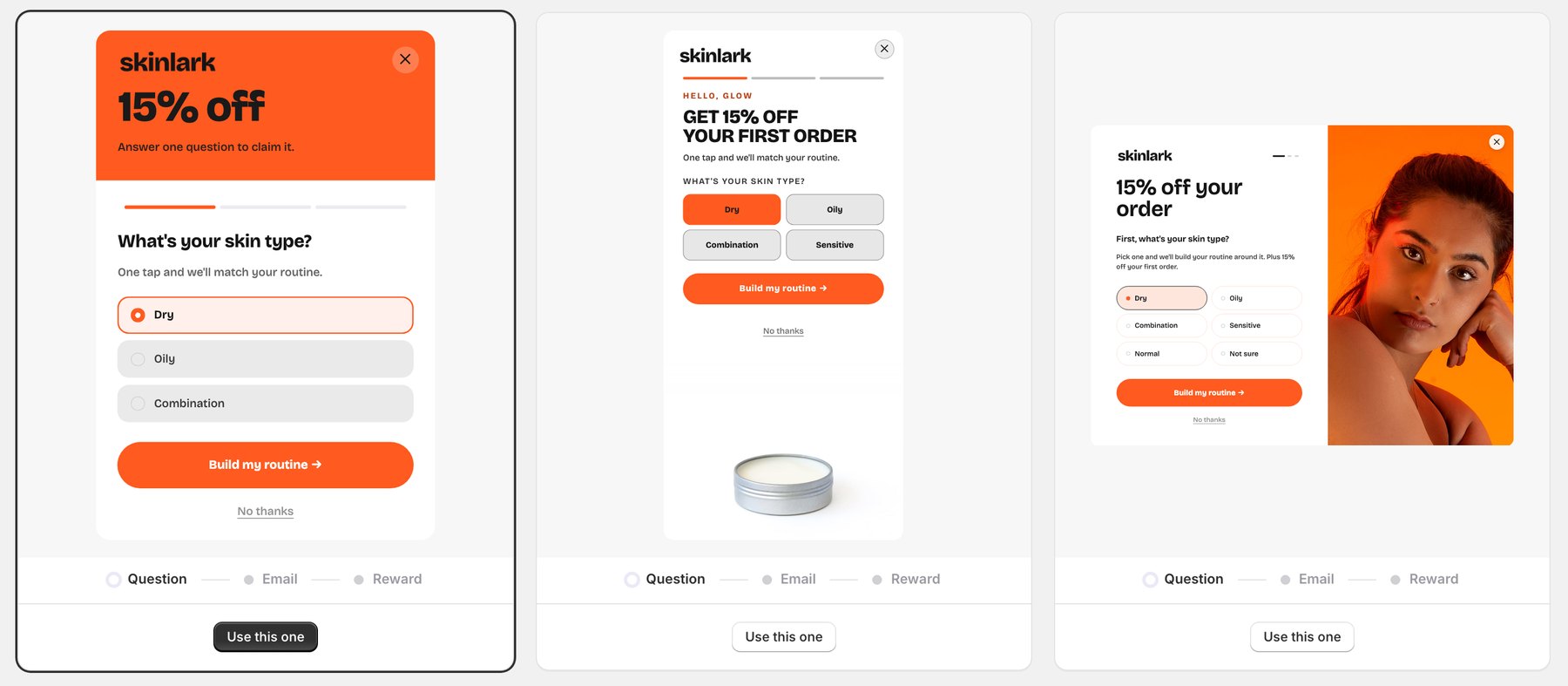
You answer four short questions. The app takes your logo, colors and fonts from your theme and the photos from your products, writes the question for what you sell, and makes three popups. Pick one, change any word, publish.

The app's Pick your popup screen for Skinlark, a skincare store in orange and white: a popup with an orange header, one with a tin of balm melting into white, and a split layout with a portrait against orange. Each asks What's your skin type?
The pick screen, for an example skincare store

It looks like your store, not a plugin.

Wiglet popup in pink with a French bulldog in a party hat at the bottom: Who are you shopping for? with My dog, My cat, It's a zoo and Another pet.
Pet supplies
Swellday popup over a beach and waves: You've got 15% off, then What do you ride? with Shortboard, Longboard and Foamie.
Surf
Bendi popup in sunny yellow: a big 15% OFF, then What's your practice? with Yoga, Pilates, Running and Strength.
Activewear
Picnicly popup with a tall red header saying 15% off, then What are you planning? with A picnic for two, A party and Everyday dining.
Picnic goods
Lobline popup in white and green with a tennis ball at the bottom: What do you play? with Tennis, Padel, Pickleball and Squash.
Racket sports
Skinlark popup: a portrait against bright orange, then What's your skin type? with Dry, Oily, Combination, Sensitive, Normal and Not sure.
Skincare
Swellday popup with a navy panel saying Surf's up, then What do you ride? in a grid of six boards.
Surf
Daisybell popup: white daisies in a jar, then Who are the flowers for? with Me, My partner, A friend and Mom.
Flowers
Fizzwell popup in lilac and hot pink, with three sprinkle milkshakes at the bottom: What are you craving?
Shakes & sodas
Bendi popup with a hot-pink Hello. header over yellow: What's your practice? in a grid of six.
Activewear
Lobline popup in pale green: a big 15% OFF, then What do you play? with Tennis, Padel, Pickleball and Squash.
Racket sports
Sunnibee popup painted in the pink of its photo, with sunglasses at the bottom: What are you shopping for?
Eyewear
Works with your stack

You already pay for a powerful email tool. Give it fuel.

Your email tool already runs automatic flows. It just has nothing to personalize with. Zeropartly feeds it every answer, so the flows you're paying for finally send the right thing to the right person.

Pick your tool→Connect once→Done · no code
Zeropartlyyour email tool
KKlaviyo
OOmnisend
MMailchimp
Each one receives every synced answer. No per-tool setup.
Right visitor · right moment

Aim every popup at the traffic you paid for.

Zeropartly reads each visitor's campaign tags and device. Someone who clicked your Spring Sale ad sees a popup built for that campaign, not a generic box, and Zeropartly keeps testing when to show it, so the same traffic converts more.

Target by sourceUTM-aware
Match the offer to the campaign each visitor clicked.
facebook / spring-sale→Spring Sale popup, 15% off
google / free-ship→Free shipping, as the ad promised
your email→Already subscribed, no popup
utm_sourceutm_campaigndevicereferrer
Best momentauto-optimizing
Zeropartly tries each of these and shifts to the one that gets the most sign-ups.
5 seconds after landing
After scrolling 60% of the page
When they move to leave
On the second page they open

Clicked in from one of your own emails? They're already on your list, so Zeropartly skips the signup popup. Prefer manual control? Set the trigger and the audience yourself in the Triggering and Audience steps.

How it works

One question now. The right email later.

Same popup, same discount. Zeropartly just asks one thing on the way in, then hands every answer to your email tool automatically. It even finds the best moment to show it, and matches the offer to the campaign each visitor came from. Try it on a store like yours.

Pick a kind of store
The Wiglet popup the app built: Who are you shopping for?
1 · A shopper taps an answer
Who are you shopping for?
2 · The answer syncs to your email tool
shopping_for:My dog
on their profile in Klaviyo, Omnisend or Mailchimp
3 · The email that follows
W
Wiglet
to someone who tapped "My dog"
For your dog: the starter box, 15% off inside
Chews, a chew-proof toy and the food that fits a pup. Your code is already in.
Sent by your email tool, written for that answer
Syncs with
KKlaviyoOOmnisendMMailchimp
Why it works

A signup isn't a sale. The next email is.

The discount gets the email. The question makes the email worth opening. Same subscriber, two very different welcomes.

Without Zeropartly · everyone gets this
S
Your Store
to a new subscriber
Welcome! Here's 10% off
Thanks for subscribing. Use code WELCOME10 on your first order. Happy shopping!
VS
With Zeropartly · built from their answer
S
Your Store
to someone who tapped "Dry skin"
Your dry-skin starter, 15% off inside
Dry skin needs a strong barrier first. Here's where we'd start, and your code's already inside.
Sent by your email tool, triggered by their "Dry skin" tap
Know your visitors

See who each channel really sends you.

Every answer is joined to where the shopper came from and whether they bought. One table says what your Meta visitors want, what your Google visitors want, and which of them buy, including the ones who leave without buying.

Their answer+where they came from+what they bought
Who each source sends
Answers to “What's your skin type?”
Last 30 days
SourceMost common answerSubscribersBought
MetaDry18423
GoogleOily12111
TikTokSensitive624
Example: a skincare store's Growth page
Opportunities
Make a popup for your Meta traffic
Most visitors from Meta answer “Dry”. No popup speaks to them yet.
Create popup
Catch leavers on product pages
A popup that appears as visitors leave, on product pages only.
Create popup
Only visitors who arrive from Meta will see that popup
Act on it

Your next popup is one click away.

The Growth page turns what you learn into the next move. One click, and the app writes a popup for exactly those shoppers and shows it only to them. You check every word before it goes live.

Proof

See what your popup actually earned.

A small share of visitors never see the popup, on purpose. Comparing what they buy with what your subscribers buy shows the sales the popup made, not luck. The number appears once enough visitors have come through, so it is never a guess.

What the popup made
+$2,184this period
BoughtRate
Your popup subscribers41 of 35711.5%
Visitors who never saw the popup3 of 614.9%
Example: a skincare store, one month
Pricing

Every feature on every plan.

Self-serve, 14-day free trial, cancel anytime. A bigger plan only buys more page views.

Growth
$39/mo
50,000 page views a month
Scale
$99/mo
150,000 page views a month
Plus
$199/mo
500,000 page views a month
Every plan includes
Capture
→Unlimited popups, built from your store
→Ask shoppers one question
→Klaviyo, Omnisend and Mailchimp sync
→One-time discount codes
Know
→What shoppers want, and which of them buy
→Where your signups and buyers come from
Act
→Different popups for different ads or devices
→Suggestions for your next popup
→Automatic timing, learned on your visitors
Prove
→How much the popup earned you
Join the waitlist
FAQ

Questions,
answered.

Everything else is one tap away once you install. No sales call required.

Do I need to be on Klaviyo?
No. Zeropartly syncs every answer into whichever you use: Klaviyo, Omnisend or Mailchimp. It's built to be email-tool independent.
Will it match my brand?
Yes. The app takes your logo, colors and fonts from your theme and your photos from your store, and makes three popups in your brand. It reads like part of your store, not a bolted-on plugin.
How long does setup take?
Minutes. Install, answer four short questions, pick one of the three popups it makes, connect your email tool, publish. No developer and no code needed.
When does the popup show?
Automatically. Zeropartly tests when to show it on your own visitors and keeps the moment that brings the most signups. You can also set the trigger yourself in the Triggering step.
Can I use my own discount codes?
Yes. Zeropartly can make a one-time code per shopper, use a code you already have, or leave the code to your email tool's welcome email.
Do you send the emails too?
No. Your email tool sends them. Zeropartly just makes those emails smarter by feeding it the answer behind every signup.
Is there a free plan?
No, a free trial: every plan starts with 14 days free, and nothing is charged if you uninstall before it ends. From $39 a month for 50,000 page views, the same number you see in Shopify analytics; a bigger plan only buys more page views, every feature is on every plan.
Why do you count page views, not popup views?
Zeropartly works on every page, not only the one where the popup appears. On each page it reads where the shopper came from, follows their path, and decides whether this is the moment to show the popup; later it joins that path to the signup and the purchase. That is what "what shoppers want", "where your buyers come from" and "how much the popup earned" are built on. So a plan covers every page it works on, and the count is the same page views you see in Shopify analytics, crawlers left out.
What happens if I go over?
Nothing is charged. The first time, your popups keep running to the end of the cycle. After that they pause at the limit until the cycle resets or you move up a plan. No overage bills.
Will it slow down my store?
No. The script is under 20 KB, loads once, and fetches the popup itself only when it is about to show. It never runs on checkout.

Grow a list that actually buys.

Zeropartly is launching soon. Join the waitlist and we'll let you know the moment it's ready.

Join the waitlist